

Plug to your codebase (1 minute)
You can either plug Prismy to your Git repo (GitHub or GitLab) or use Prismy Hosted to store and serve translations in the cloud.1
Choose your integration
GitHub
GitLab
Prismy Hosted
2
If you chose GitHub or GitLab: specify the location of your translation files
You can do so from your Settings: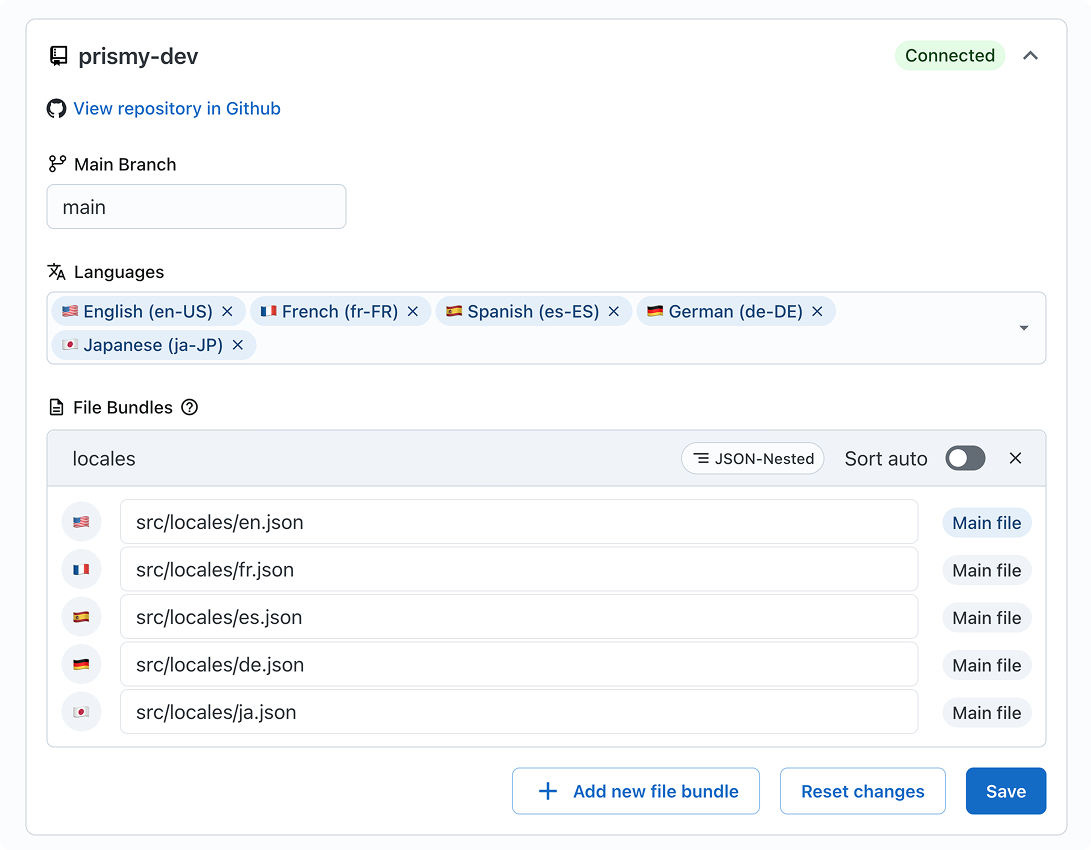
You must have a framework with a built-in support of localization in place or an i18n library implemented.
Learn more about Pre-requisities and supported frameworks and files.
You are all set 🎉 From now:
Git: Prismy syncs your translation files automatically
Git: Prismy detects missing translations in Pull Requests
Git: Developers can generate translations in one click; translators can
review and make changes
Prismy Hosted: Push/pull via API or CLI; Prismy hosts files and serves
CDN URLs. See the Prismy Hosted flow.
Tailor your AI (3 minutes)
The first step to world-class documentation is setting up your editing environments.Set your company description
Give context about company to the AI
Setup your glossary
Ensure consistency and improve translation
Specific instructions (optional)
Prismy has already instructed your AI translator to fit your languages
standards. But in case you need to be more formal or specify specific tone
of voice.